CFD Portfolio Upgrade
Redesign the experience from the ground up to serve how traders actually manage margin, positions, and risk.
A critical tool that wasn't serving traders
The portfolio module is one of the most critical tools for a trader — yet the current Pepperstone experience was far from satisfactory. The existing design failed to serve traders' core needs: managing portfolio health, evaluating portfolio index, and monitoring positions under live market conditions. Feedback consolidated from internal insights, data, client feedback, and competitive research all pointed to the same gap.
"The charts are so small — even when maximised — to be of any use on a phone."
"Buy and sell buttons unnecessarily dominate a third of the screen."
"The whole experience is extremely sluggish — like wading through treacle."
"The pinch and zoom function is so erratic it's barely usable."
"Trading and managing stops directly on the chart is practically impossible."
"This feedback box itself is another example of how ill-conceived this app is."
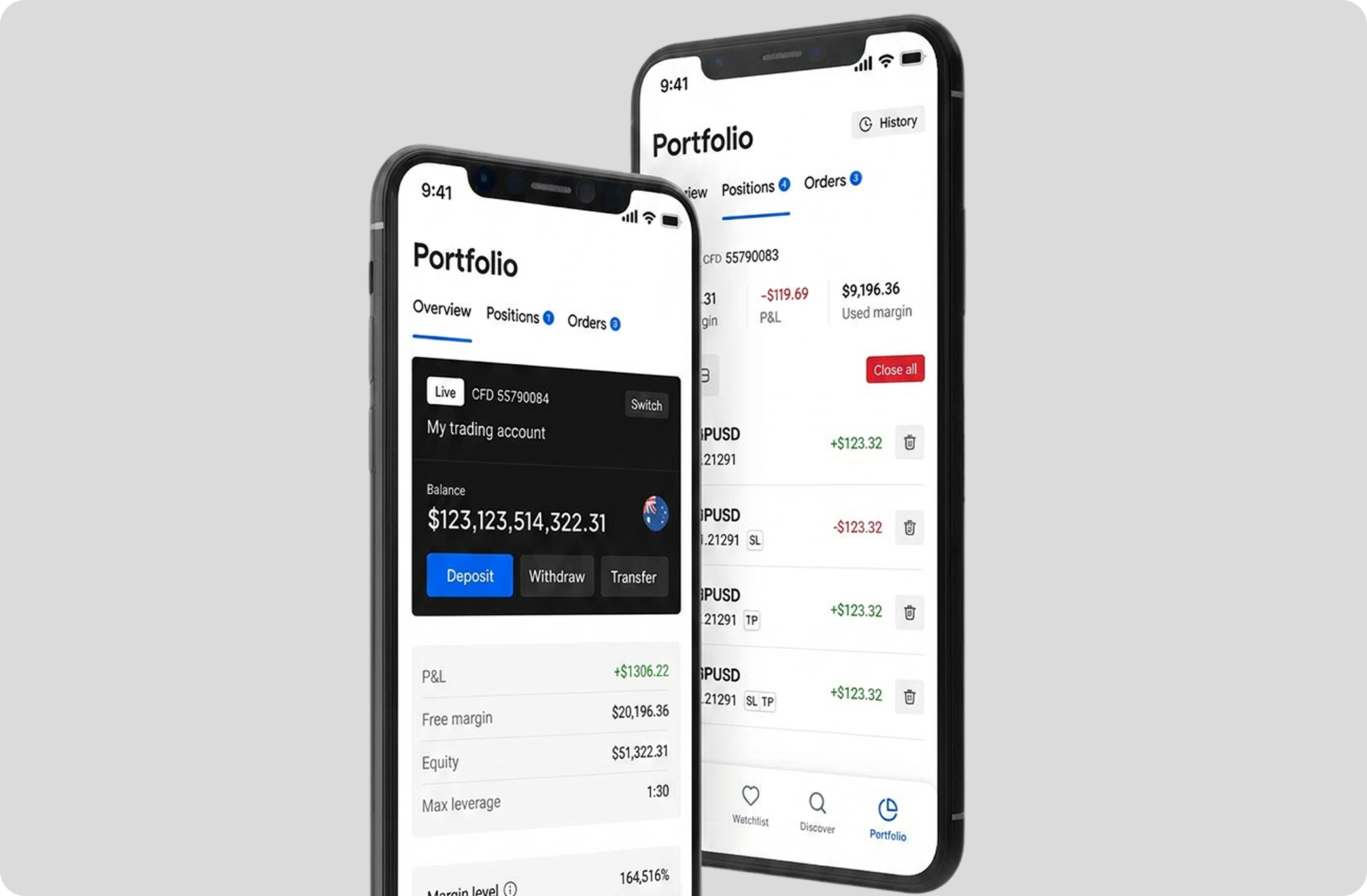
The Overview tab leads with a large balance card and account number — but traders primarily need margin health and P&L at a glance, not raw balance. Critical metrics (free margin, equity, margin level) are buried below the fold.
Margin level is shown as a percentage (164,516%) with a progress bar — but the bar's scale is unclear and the "margin call" threshold marker provides little actionable context for a trader managing risk in real time.
Multiple GBPSD positions with near-identical entries (same pair, same price, similar P&L) are difficult to distinguish at a glance — especially when hedging. There is no aggregated view to show net exposure across positions on the same instrument.
Deposit, Withdraw, and Transfer are prominently placed on the Overview tab — but these are low-frequency actions for active traders. They occupy prime screen real estate that could surface more relevant trading information.
Closing or modifying individual positions requires tapping a trash icon per row — with no bulk management option visible beyond "Close all." Traders managing multiple positions have no efficient way to selectively close or modify a subset.
Stop Loss and Take Profit tags (SL, TP) appear as small labels in the position list but carry no values inline — traders have to tap into each position to see their risk parameters, adding unnecessary steps under market pressure.
Crypto portfolio vs CFD portfolio
A competitive analysis was conducted across leading CFD brokers to understand how portfolio experiences are designed and prioritised in the industry. The research revealed a clear pattern — the information architecture, UI conventions, and data hierarchy of CFD portfolio screens are fundamentally different from those found in crypto and Web3 platforms. What traders need to see, and in what order, operates by an entirely different logic.
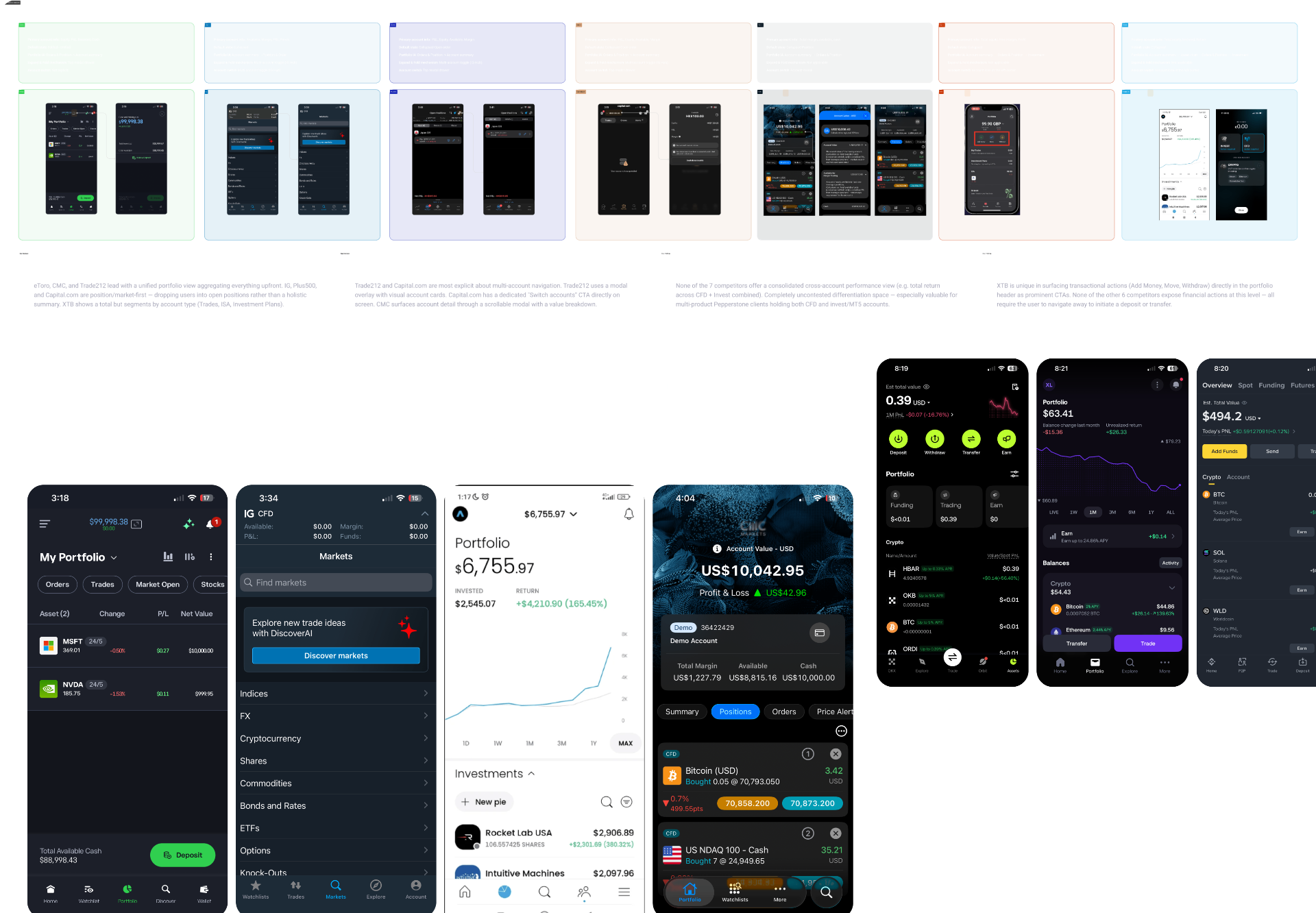
CFDs are derivative products traded on margin. Users do not own the underlying asset — they are trading the price contract. Margin ratio, financing costs (overnight swaps), and liquidation risk are the primary operational constraints. The actual portfolio size is significantly larger than deposited capital — a dynamic that standard crypto portfolios never have to account for.
In CFD trading, every single order is tied directly to the lifecycle of a specific contract. CFD systems track orders and positions together — unlike spot crypto, where trade execution and the resulting asset are completely decoupled the moment a transaction finalises.
Crypto portfolios typically open with a continuous historical asset chart. CFD platforms — MetaTrader, Plus500, Interactive Brokers — notably skip this. Because CFD traders don't own an asset, they are tracking the real-time safety metrics of active structural bets, where live numbers matter far more than a historical timeline.
Four principles anchored the redesign
From traders' words, and competitor analysis we've identified four design principles that anchored the redesign direction.
A single-tap entry point to view all open positions, anchored by a prominent Portfolio Health (Total P&L) module — giving traders instant macro-clarity without navigating away.
Dynamic rows surfacing real-time telemetry — live streaming Bid/Ask prices, individual P&L, and directional data (Buy/Sell) — to ensure scannability under market pressure.
Contextual inline actions allowing users to instantly close an individual trade, edit or modify risk parameters (SL/S/TP), or pivot to historical trade logs — without leaving the portfolio view.
A conceptual upgrade that collapses multiple micro-orders of the same asset into a single unified row — eliminating visual noise and helping traders evaluate net market exposure at a glance.
From a flat list to a portfolio you can read in one breath
Same data, restructured around margin health, aggregated positions and contextual SL/TP — turning a flat list into a portfolio traders can read at a glance.
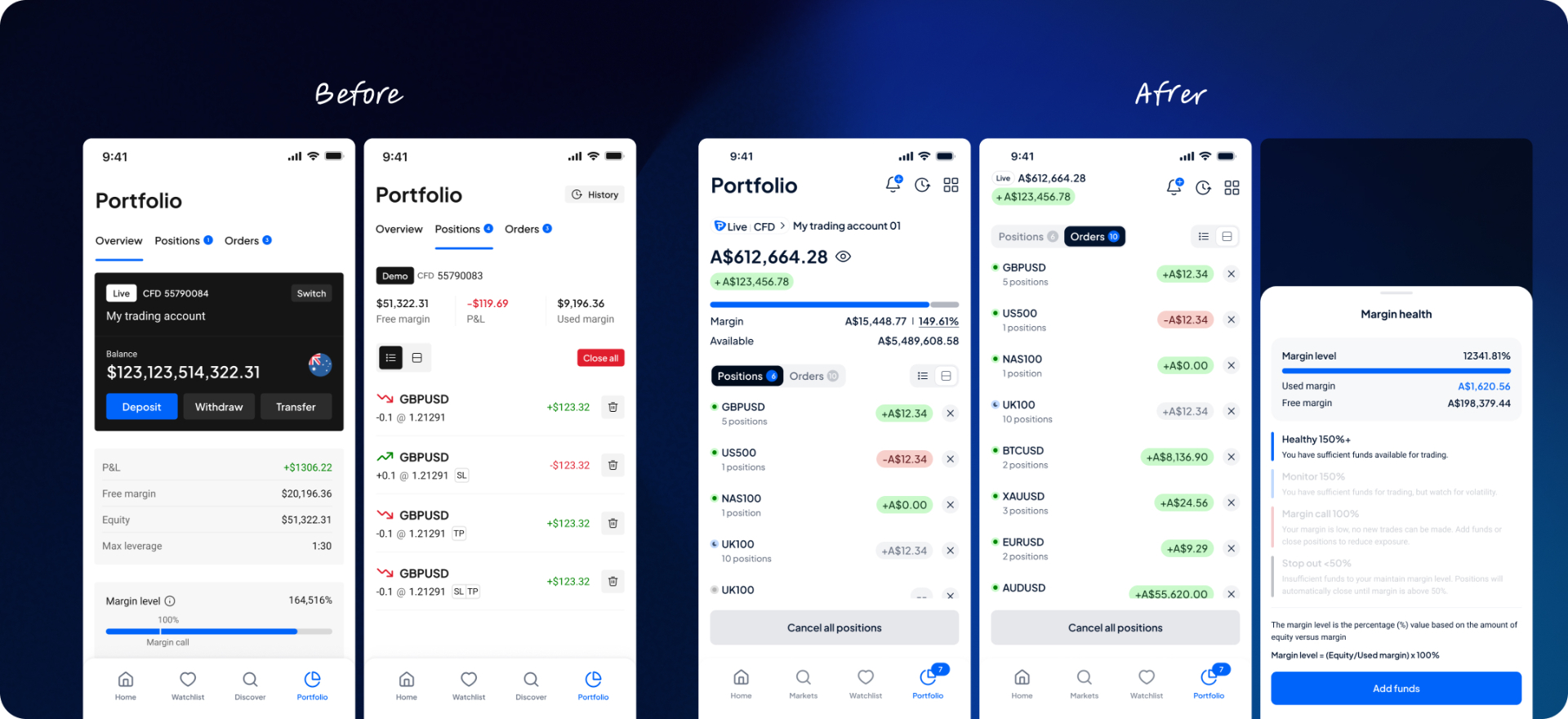
The navigation flow was redesigned from a horizontal tab structure to a single-page layout — allowing traders to see both margin summary and portfolio positions within the same view without switching context. All critical information is visible without tapping, directly aligning with the baseline experience that leading competitors such as eToro and XTB already provide. Information priority was restructured across the first and second layers, dramatically reducing cognitive load at the moment it matters most.
Both an aggregated view and an individual list view were introduced to serve traders who hedge or nest positions across the same instrument. Tiered cancellation controls give traders more precise control over how they manage and close positions — reducing the friction of bulk actions while maintaining flexibility for selective position management.
Unlike crypto platforms, CFD traders are less sensitive to routine payment actions — Deposit, Withdraw, Transfer, and History — given the leveraged nature of the product. Deposit remains accessible for margin call scenarios, but quick actions have been moved to the side menu to free up prime screen real estate for trading-critical information.
Strong colour usage and contrast were reduced to establish a clearer visual hierarchy driven by data relevancy. P&L figures are now more scannable at a glance — a meaningful improvement over the previous inline +/- value format that required closer reading to interpret.